Showing posts sorted by relevance for query panda puppet. Sort by date Show all posts

Monday, January 22, 2007

Panda Puppet: Day One

Panda Puppet Digital Puppetry Studio

This morning I am sitting down at the computer for my first official day working at Panda Puppet. If you've followed Machin-X for a long time you'll know that Panda Puppet has been in the works for awhile. It grew out of some work I did about a year and a half ago developing a system called Flash Puppet that was used to produce a demo for a Flash Animated children's series in the U.S. When the system is finished, Panda Puppet will be a "studio in a box" that will allow you to produce real-time animation via a puppetry interface. It's being built using Blender, the leading open source 3d modelling and animation software package.

Various work has been going with Panda Puppet part-time off and on for about a year, a lot of it focused on experimenting with different ways to allow puppeteers to control characters in a digital 3D environment. I wasn't expecting to start full-time work on Panda Puppet until sometime in the summer, but as luck would have some basic real-time animation would be very useful for an upcoming project so getting the system up and running is now a priority. The specs for everything are pretty much in place and I think I've got the hardware issues I mentioned last year licked. I'm committed to delivering a proof-of-concept in about eight weeks so I'm going to be very, very busy writing and testing computer code for the next two months.

I'll be blogging my progress on Panda Puppet and explaining more about the system and how it works in the coming days and weeks. Assuming everything gets working properly this is going to be really, really nice to play with.

Tuesday, September 23, 2008

Panda Puppet Update

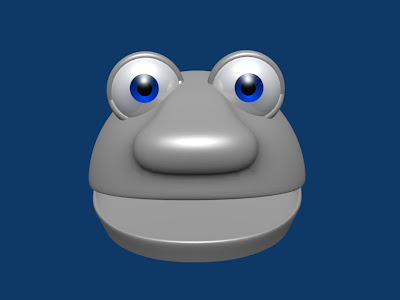
Panda Puppet logo
It's been quite awhile since I updated Machin-X and for that I apologise; I'm hoping to be able to do more frequent updates in the future. I've gotten dozens of emails about Panda Puppet over the past few months so I wanted to post an update about the project, where it's at and what is (and isn't) happening with it right now.

I have not done any serious work on Panda Puppet for most of this year. This is due in part because I've been busy on other puppetry-related projects, but also because I have been waiting for a number of new features in Blender that I believe will improve it's usability for Machinima/digital puppetry purposes.

I do currently have a very crude working version of Panda Puppet (for Blender 2.46),but it's extremely basic, hacked together and not really suitable for public release (browse the Panda Puppet posts to see some of the old demos). There have been lots of great improvements to Blender's game engine this year (most of them developed for the Apircot video game project). The two huge new features that I've been waiting for are full character animation in real-time and real-time softbodies in Bullet, Blender's physics engine. All of the new features developed for Apricot will be included in Blender 2.48, which is tentatively scheduled for release next week. Once that is out and Ashid's great video texture plugin is updated to work with 2.48 I think it'll be time to get back to serious work on Panda Puppet again.

There seems to be serious interest in putting together a small developer's site for the project and I'm also applying for a grant that would help speed along development on Panda Puppet. In the meantime, I would love to get some help with the project. Is anybody out there handy with rigging armatures in Blender? If you are drop me a line at puppetvision {at} gmail dot com.

Thursday, February 08, 2007

Panda Puppet Progress

Sales Guy
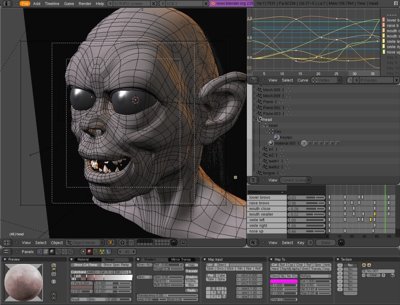
"Sales Guy" is the talking head being used to program Panda Puppet right now.

Just a quick update about ongoing developments with Panda Puppet. The image above is "Sales Guy" the nickname that's been given to the head being used to map and program the facial controls for Panda Puppet. I was hoping to have some video of Sales Guy in action to post here by now, but Sales Guy kind of, uh, broke earlier this week. I'm still trying to get to the bottom of the problem, but I hope to have it resolved before the end of the day today.

What's always interesting about a project like this is that things that you expect to be difficult turn out to be relatively simple while the little things that you expect to be easy end up being very, very hard.

Last week I came to the conclusion that Blender's internal game engine is not really up to snuff. The 3d engine and can't meet all of Panda Puppet's needs (there are plans to overhaul Blender's GE using OGRE, but there's no confirmed time line on when that will happen). I've been exploring using Crystal Space as Panda Puppet's 3d engine via a nifty Blender plug-in called Blender2Crystal. Unfortunately, the plug-in doesn't seem to be widely used and there is limited documentation available so things are slow going on that front.

The other thing I have been looking in to is the Sunflow renderer, which looks promising. Although Panda Puppet will work in real-time, one it's key features is that performances can be tweaked, edited out and rendered out as conventional animation. Sunflow isn't natively supported by Blender right now, but there does seem to be some interest in getting more support for it from the Blender community.

I have learned more about programming and 3D graphics in past three weeks than I have in the previous ten years.

Back with more soon!

Wednesday, May 23, 2007

Quick Panda Puppet Update

There's been some renewed interest in Panda Puppet recently in the blogosphere and I've been getting emails asking about the status of it so I wanted to post a quick update. Long story short I had a somewhat unexpected death in my family back in April and some of the things I was working on (primarily Panda Puppet) had to be set aside for a little while, which I'm sure everyone can understand. I'll be returning to work on Panda Puppet more or less full-time in a few weeks and when that happens I'll bring everybody up to speed on all the latest.

For those of you visiting Machin-X for the first time, read these posts to get a general overview of the project.

Wednesday, March 07, 2007

Controlling Digital Puppets

Since a few people have emailed me asking about this, here is some more info on the control system I am developing for Panda Puppet and how it works, or at least how I am currently trying to make it work.

Panda Puppet is shaping up as a Python plug-in for Blender. At this stage I am not trying to make it do anything that isn't already possible in Blender's Game Engine, I just want to streamline the way characters can be set-up and controlled in real-time. The core of Blender's GE is Logic Bricks (sometimes called Logic Blocks) which are used to set up and control interactions between different game elements like characters, props, etc.

This is what Blender's Game Logic Panel looks like:

Blender's Logic Brick System

Once again I won't go in to all the technical nitty-gritty of Logic Bricks here, but if you want to learn more just click on the link above.

Panda Puppet's control system is a simplified interface for quickly setting up Logic Bricks in way that's ideal for controlling digital characters. I am still in the early stages of programming this so all of it may change, but this is how I am designing the control system right now:


Click on the diagram to enlarge it

Sensor Type

The sensor type is the type of device used by the puppeteer to control on an on screen character or object. This can be almost any kind of device imaginable, including a joystick, keyboard, gamepad, dataglove or even a Wiimote. I want Panda Puppet to be as flexible and "controller agnostic" as possible. Rather than forcing a puppeteer to adapt to a specific type of input device, I want a control system can be customized to the needs and preferences of a puppeteer and I want different puppeteers performing in a scene together to use different types of controls if they want.

Sensor Input

Sensor inputs are specific types of inputs from an input device. For example, the press of a button on a keyboard or the x-y axis movement of a joystick.

Sensor Action

Sensor Actions are control types that govern a character's action and determine what happens when a puppeteer uses a specific sensor input. There are three different types of Sensor Actions - direct controls, pose controls and emotion controls.

Direct Control
Using direct control a puppeteer has direct control over the movement of a specific part of a digital character. For example, The x-y "walking" movement of a character can be assigned to the x-y axis movement of a joystick so that when the joystick moves in a specific direction the character walks in a corresponding direction.

Pose Control
Pose Control is used to assign specific poses or movements to a specific sensor input. For example, an elaborate shriek or a comedic double-take could be triggered by a joystick button.

Emotion State Control
Emotion State Control influences the movements and poses of a character according to the character's emotion state. An emotion state can be assigned to a specific sensor input and triggered when that control is activated and will influence the character as long as the input control remains active. If the emotion state "happy" is assigned to a joystick's trigger as long as the trigger is pressed the character will remain "happy".

Typically, there are six primary emotional states - anger, disgust, fear, joy, sadness and surprise. Just as primary colours can be modified and mixed to create every other imaginable colour, primary emotional states can also be mixed to create every emotional state imaginable. For example, Anger + Disgust = Rage. Emotion state combinations can be triggered by activating a combination of sensor inputs (when primary emotion states are assigned to individual sensor inputs) or mixed emotion states can be grouped and triggered by a single sensor input.

If anyone out there has thoughts, ideas and/or suggestions about all of this please feel to drop me a line at puppetvision {at} gmail dot com.

Wednesday, November 30, 2005

Digital puppetry projects

In January I'll be formally launching my new puppetry-oriented production studio, which has actually been in existence since 2004 but I've tried to keep under the radar while I spent a year at a small business incubator for young entrepreneurs in Toronto and did a considerable amount of research in to - yup, you guessed it - digital puppetry.

I don't want to say too much about the new studio just yet. Things are still very much in flux with it - at the moment the studio consists of basically just me with a few friends who are artists and puppeteers lending a hand when the need arises - but I will say that the studio's focus is exlcusively on creating character-driven content by blending puppetry with digital technology.

There are a few small projects in the pipeline at the moment and the techniques range from shooting conventional puppets against green screen and compositing them in digital environments to puppeteering digital characters that are rendered in 3D in real-time. It's still all very experimental but some of tests are looking very, very cool. I hope to be able to share some of them soon.

One of the reasons it took so long to get up and running was that as I mentioned in my first post, there is a serious lack of good tools for doing digital puppetry. Since the tools didn't exist (or weren't affordable) I've had to learn to make them myself. At the moment I'm working on two different Digital Puppetry Systems (DPS), one 2D and the other 3D:
Flash Puppet DPS - This is a custom-built, proprietary digital puppetry engine for Flash. In it's present form it's basically a series of Action Script routines that allows a puppeteer to control a digital character in real-time using external input devices. The characters are manipulated in 2D, although the engine can simulate the look of 3D by using either pre-rendered bitmapped sprites or by performing some clever motion tweening on vector-based illustrations. It's still in a beta phase and there are tons of bugs to work out, but the results so far are incredible. I'm supposed to deliver the first video mid-December so hopefully I'll be able to share that with everyone before the holidays.

Panda Puppet DPS - Whereas Flash Puppet is almost ready for use and a closed, proprietary engine (I developed it primarily for my own use and don't plan to publicly release it) this is still in the design phase but will be a completely free, open source program based on the Panda 3D Engine developed by Disney. The goal is to have a puppetry-centric, free and open application that's similar to Alias MotionBuilder (which I'm also using). I'm just past the planning stages and currently soliciting help with programming it in Python. I hope to have a working beta of Panda Puppet by late next year and a fully functional release sometime in 2007. There's a project page for Panda Puppet at SourceForge, although I haven't had time to post much there just yet.
I'm going to use Machin-X as a project blog of sorts and I'll chronicle the development of both systems here, along with news and thoughts about digital puppetry in general.

Tuesday, March 28, 2006

Panda Puppet migrating to Blender


A screenshot of Blender in action.

Just a quick update for those who have expressed interest in the Panda Puppet digital puppetry application (see previous post)...after some careful consideration I've decided to migrate the project away from Panda 3d to the Blender Game Engine instead. I've been very impressed with the latest version of Blender and I'll be using a Blender-based pipeline for a couple of projects I have coming up so it only made sense to make the switch. Blender also enjoys a much wider user and developer base (numbering about 250,000 people I believe) so that's a nice added benefit as well.

I'm probably still a few months away from assembling a decent working Panda Puppet script, but when I do you'll see it here.

Monday, March 12, 2007

What you could do in Machinima

Brian Stokes, whose blog I always enjoy reading, linked to the fantastic French student animation film Burning Safari a little while ago alluded to the fact that it's difficult to do something like it in Machinima. While I agree completely that it would be nearly impossible to make Burning Safari with most existing Machinima and digital puppetry tools, after spending sometime looking at the films in terms of what I am working on with Panda Puppet I think this type of animated film could definitely be done using real-time techniques.

As a theoretical exercise I broke down the main sections of the film and I'll describe here how would approach them using digital puppetry techniques:


The Spaceship Landing - Easy enough to do, lots of video games already have vehicles like this in them. `Nuff said.


The Little Robots - These guys sure are cute. There are two possibilities for performing them that I can imagine; the simplest way would be to create walk cycles for them and then having a puppeteer simply control their X-Y movement within a scene. Another possibility would be to use a data glove on a flat surface like a table with each leg controlled by a different finger. This would allow more spontaneous and specific control, but running around might be difficult if you didn't have a large enough space to perform in.


"Robo-Vision" - To be perfectly honest, I would cheat this shot in After Effects.


The Monkey - Boy, I love monkeys. There's just something funny about them. In fact, he bares a striking resemblance to "Suzanne" the Blender monkey-head primitive. Controlling a character like this will be relatively straight forward with a control system like Panda Puppet.


See Monkey Get Mad - The only thing funnier than a monkey is an angry monkey. This type of moment in a scene seemed like a real challenge at first, but I have been playing with an idea I call "Emotion State Control" which would influence the movements and poses of a character according to the character's emotion state. If the emotion state "happy" is assigned to a joystick's trigger as long as the trigger is pressed all of the "happy" versions of different movements and poses would be used.


See Monkey Run - Once again, running is done using simple walk cycles. Leaping, jumping, etc. is fairly easily using a combination of walk-cycles and physics. Even the squash and stretch is fairly easy to achieve.


See Monkey On Fire - Ragdoll physics would work nicely in this situation. I would do the energy squares or whatever the robots are chucking at the monkey and the fire on the monkey's face in post using After Effects or something similar.

The other big problem that needs to be addressed is image quality. The graphics in real-time rendering are tied to a computer's ability to draw polygons onscreen. The more polygons a computer can draw and the faster it can draw them, the better the graphics. So having high resolution real-time graphics is really just a matter of having enough computational power. With enough of it, theoretically, you can render graphics of this quality in real-time. In fact I've seen real-time 3D demonstrations that exceed the quality of Burning Safari. Another work around is to simply do performances in real-time at low resolution and then render out higher quality resolution frame by frame afterwards.

There you have it, easy-peasy. Well, almost.

I don't mean to suggest that something being technically doable means it's easy artistically. Making great films is hard no matter how you do it. And even when I get Panda Puppet or someone else gets another digital puppetry system to the point where it can do all this all it will be is just a great tool. Having great tools is awfully nice, but what ultimately makes great art is a great artist.

Wednesday, January 02, 2008

Video and Blender's Game Engine

Work continues with Panda Puppet slowly, but surely. I haven't been able to share much of what I have been doing lately because my work is focused on two client projects that I can't really blog about at this point, but I am starting up my Bear Town web series project again and plan to be using Panda Puppet heavily on that in the coming months.

What has me most excited right now though is that "Ashsid" - who wrote a lot of the original Blender scripts that much of Panda Puppet is based on - has been working on a cool new video texture plugin for Blender's game engine that allows you to combine real-time graphics with various other sources like video files, live video, rendered 3d scenes, etc. inside Blender.

This has all sorts of interesting applications, the coolest of which is tracking the movement of a camera and applying that movement to a Blender object. Here's a demo of it in action with Suzanne (the famous Blender monkey head) combined with live webcam video:


What excites me most about this is that it enables puppeteers working with monitors to have physical puppets and digital ones interact in real-time. That isn't a new idea of course, but what's great about this is that now anyone can download the software and try it themselves.

Nice work Ashsid!

Wednesday, March 14, 2007

Panda Puppet: Head Control Test #3


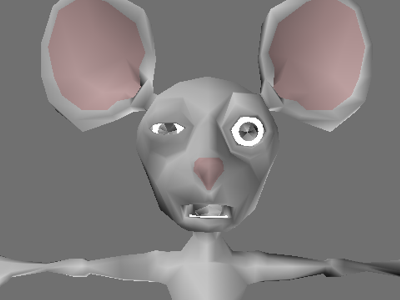
Another Panda Puppet head control test; this time I wanted to experiment by mapping controls to a pre-existing character rigged for conventional animation so I used a fun looking mouse character created by a Blender user named "Clean3D" (the original mouse rig can be downloaded here). In the video I first demonstrate some very basic actions and then show how they can be mixed together to create different types of movements and expressions. I couldn't get as much control out of the rig as I would have liked, simply because the way it was build isn't ideal for Panda Puppet, but it still turned out pretty well.

Mouse rendered using real-time graphics

Of course these real-time graphics leave something to be desired. I am still working on the programming that will record real-time performances to Blender animation, but here's what a final render of the real-time frame above would look like:

Final Mouse render

Not too bad. Thanks again to Clean3D for the great Mouse rig!

Tuesday, March 06, 2007

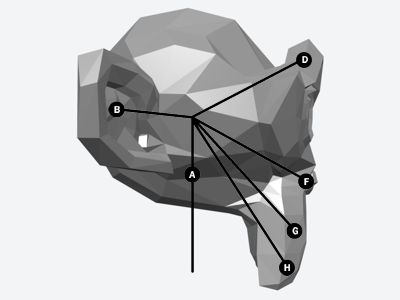
Rigging a Monkey for Panda Puppet

One of the features that Blender's Ketsji game engine is noticeably lacking is the ability to use shape-keys. In case you're not familiar with them, shape-keys (sometimes called "blend shapes" or "morph targets" in other 3D software packages) allows you to save and store different shapes of your character. In animation this is very useful for doing things like lip sync and creating facial expression.

Working on Panda Puppet I was stuck for quite awhile trying to figure out a work around for this problem until I stumbled across an article on bone based facial animation. I won't bore you with all the details (if you really want them, click the link) but essentially the idea is to stick a bunch of bones in a character's head and have each one control a different area of the character's face.

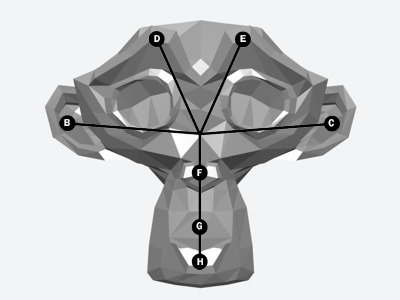
Here's how I am currently rigging using the default monkey head in Blender:


The bones work as follows:

B/C - Ears
D/E - Brow
F - Nose
G - Snout
H - Jaw


Here is a side view, in which the "A" bone (the primary head bone) is visible.

I am working with a low-poly head, made up of about 500 polygons. The poly count could be higher (more polys = smoother shape), but I am keeping it simple for now. Hopefully this "bone-based approach" will work. I need a more or less functional monkey head by March 15th to meet the deadline I am working with. The next week and a half is going to be very, very busy!

Thursday, March 08, 2007

Panda Puppet: Head Control Test #1


Success!

After spending the day working out several bugs, here is a quick test of the head control system I am programming for Panda Puppet. It's nothing fancy, just some basic head movement (up/down, right/left, tilt), but it works quite nicely. The head is controlled using a joystick, but almost any kind of device imaginable could be used as a controller. If you've read my last post on the control system, this is an example of direct control.

In the morning I'm going to tinker with this a bit to get some smoother animation and add some eyes and basic facial expressions so I can start playing with poses.

Tuesday, March 20, 2007

Further Blurring The Line Between Animation and Puppetry

One of the interesting things I've discovered while discussing some of the concepts I am working on with Panda Puppet is that the idea of digital puppetry or utilizing puppetry techniques in animation seems to get a much warmer reception from most animators than motion capture, which has been the subject of fierce discussion and debate lately. Personally, I think the fuss over motion capture has been much ado about nothing and there are lots of ways that all these different techniques can co-exist and be used in tandem with another.

As an example, animator Michael Duffy read about Panda Puppet over at Keith Lango's blog on the weekend and pointed me to Timothy Albee's Facial Animation, a plug-in for Lightwave that allows animators to do lip sync in real-time and includes a somewhat limited 'puppeteering' mode. I don't know how useful it would be for real-time performances, but it's interesting to see another example of someone blurring the lines between puppetry and animation. You can read more about the software here. A free demo can be found at the link above along with some videos showing it in action.

Wednesday, July 25, 2007

Brian Windsor wins Innovation Award for Digital Puppetry

This is just a quick post to say congratulations to Brian Windsor, who won the Puppeteers of America Jim Henson Award for Innovation for his work in digital puppetry at the recent Puppet Rampage 2007 festival in St. Paul, MN. Awarded by Puppeteers of America biannually, The Jim Henson Award for Innovation is given to recognize "innovation in puppetry that is technological, dramaturgical or collaborative in nature".

Brian and I held an impromptu demo of Brian's impressive digital puppetry work and the still work-in-progress Panda Puppet system at Puppet Rampage last week and I got to know him a bit. He's a great guy who's doing really great work and his award is well-deserved.

Congrats Brian!

Friday, December 02, 2005

Digital puppetry hardware, part one

Brian mentioned Panda Puppet and Flash Puppet in his blog yesterday and made the excellent point that there's a desperate need for both better software and hardware for digital puppetry systems.

Unfortunately, as Brian also pointed out, almost all of the decent hardware is custom-built and proprietary. Here's a run down of what a few of the better shops in L.A. use:


Jim Henson's Creature Shop - Has the proprietary Henson Digital Performance System, inspired by the Creature Shop's Academy Award winning animatronic controls and probably the most sophisicated system of it's kind in the world. I know a few people who saw a demo of the latest version of it in the fall and they say that it's very, very impressive.

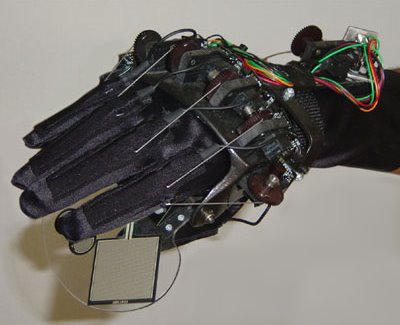
PerformFX's PerformFX glove
Perform FX - This company - founded by Henson alumni Dave Barclay and Bruce Lanoil - uses a neat little toy called the PerformFX Glove. I don't know much about it, but it certainly does look cool and given Dave's track record it's probably an awesome tool to work with.

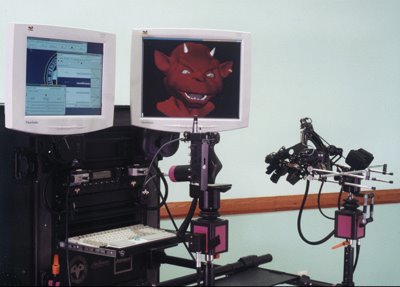
The Character Shop - Uses Waldos and owns the Waldo trademark ("Waldo" was common name for these types of devices until TCS trademarked it so no one else could use it...don't even get me started on that bulls--t). They have a whole variety of devices like the one on the right, primarily developed for controlling animatronics, but presumably they could be used for digital puppetry applications as well.

One of the interesting things that all three of these systems have in common is that they're all telemetric data input devices, not motion capture technologies (which are much, much more difficult to work with).

There's bound to be other systems like these out there. Anyone know of some that I've missed?

Wednesday, January 24, 2007

Disruptive Animation Technology

The Oscar nominations were announced today and the fact that two of the three nominees for Best Animated Film relied heavily on motion capture has not escaped the attention of many blogs on the internet. Some animators think this is the end of an era.

This isn't really anything new. Anytime a new technique or technology comes along and disrupts an existing art form the old guard get bent out of shape about it for a decade or two until things settle down and a new equilibrium is esthablished. In the 1990s puppeteers griped about the popularity of the then-new computer graphics in special effects work. Traditional animators griped about rise in popularity of 3D animation. Now computer animators are complaining about the rise of motion capture.

This seems silly to me. Photography wasn't the end of painting, electronic devices won't replace books anytime soon and despite the popularity of computer animation, old fashioned stop-motion animation is undergoing something of a renaissance. The tools and process of animation may change, but it will never go away any more than puppetry will.

I have no doubt that when (and I believe it's a matter of when, not if) real-time animation/digital puppetry/Machinima/whatever you want to call it really takes off there will be a whole new round of moaning and groaning about how it will be the end of this artform or that technique, which of course is rubbish. There is always opportunity for smart and skilled artists in these types of transitions. For example, any decent real-time animation system is virtually impossible to put together without good traditional animation skills. Ditto for motion capture, which looks awful in it's raw form.

BTW, work on Panda Puppet this week is coming a long very nicely and much quicker than I expected. I hope to have some demos or screen shots up sometime next week.

Wednesday, February 08, 2012

Real-Time Motion Capture in Blender at last!


NI Mate is software that imports Kinect motion capture data in real-time into 3D apps and they've announced that Blender is the first application that they're supporting. When I was working on the aborted Panda Puppet project several years ago I realized that one of the things Blender really needed in order to become a practical and effective tool for digital puppetry was a straight forward method of accepting motion capture data in real-time, so I think this is very exciting news and long overdue!

It should be really interesting to see what people start doing with this new capability in Blender. 

NI Mate is now available in open beta for both Windows and Mac OS X (Linux support is coming soon). You can register to participate in the beta and download all of the necessary software at www.ni-mate.com.

Via BlenderNation.


Saturday, January 27, 2007

Bigger (and more expensive) isn't better

While discussing my work thus far on the Panda Puppet system earlier this week, a colleague who I respect and love dearly scoffed at the notion that you could build a decent, high-end digital puppetry system using a free open source program that has a relatively tiny 7 mb installer.

"You need Motionbuilder," he told me. "You need Maya. Don't waste your time on this open source stuff." So we had to agree to disagree, but to underscore my position that bigger (and more expensive) isn't better I direct you to the story of the spoon and the jackhammer.

Note that the point of the story isn't that the spoon is the easier tool to use, just that it's ultimately the better one.

Tuesday, September 04, 2007

Quick Experiment With Panda Puppet


This was just a quick experiment that I did yesterday...I took a head that was modeled and rigged by Calvin over at BlenderArtists.org and set it up so that it could be puppeteered right inside a standard Blender window (i.e. not using the game engine) with a joystick. It was quick to set-up and fairly easy to do, I may experiment a bit more with this.

Monday, March 24, 2008

Second Life Lip Sync

My significant other and I hosted a small dinner party over the weekend attended by a number of fantastically talented and creative folks, one of whom is an artist who has been deeply involved in Second Life for awhile now. I talked about Panda Puppet a bit with him and we had a long discussion about Second Life and it's potential. I had rejected the idea of using Second Life for digital puppetry/Machinima purposes, but his enthusiasm for it coupled with the recent announcement of a basic lip sync tool for Second Life makes me want to reconsider (helpful lip sync tips can be found on The Second Life Wiki).