Showing posts with label digital puppetry theory. Show all posts
Showing posts with label digital puppetry theory. Show all posts
Thursday, February 24, 2011
Chris O’Shea's Little Magic Stories
The more artists explore new frontiers in interactive art, the more I often mind myself wondering where exactly to draw the line between what is animation and what is puppetry. A good example of this is the augmented shadow puppetry that I recently wrote about over at PuppetVision, which is sort of shadow puppetry, but also sort of not.
Another good example is this performance system created by Chris O’Shea called Little Magic Stories. It was made using the X-Box Kinect (see previous post) and the old Pepper's Ghost Vaudeville trick.
So is this animation? Digital puppetry? Or something else entirely?
Via CrunchGear.

Sunday, February 13, 2011
Why Realism Doesn't Work in Animation (or Machinima)
Salon.com has a great interview with character designer Shannon Tindle. The article mostly discusses character design and why so many animated characters (like the ones in the recent "Gnomeo and Juliet") look terrible, but also touches on the subject of motion capture animation vs. animator-driven key frame animation.
Shannon is very diplomatic throughout the interview, but makes his feelings known about movies that skew towards realism in terms of both their design and their use of motion capture. Here's what he had to say about "motion capture" animated movies like The Polar Express and A Christmas Carol:
To me this is also one of the biggest barriers preventing real-time animation from reaching a more mainstream audience. Machinima might be getting more and more popular, but it's appeal is still very niche compared to mainstream animation. The movement in most real-time animation is driven by "realistic" mocap and/or skeletal tracking. At the same time, it's difficult to find an example of a real-time animated character that exhibits as much personality as Mickey Mouse did in the early Disney cartoons of the 1930s. I think there's a direct connection there; in order to be successful in the mainstream, audiences have to be able to connect emotionalally with the characters they're watching. As Shannon points out, it's much harder to do that using realistic motion or design.
Many Machinima creators are really innovative and do an excellent job of working with and around the limitations in the software they use to make their movies, but what they really need is a platform that allows them to create better, more emotive and relate-able characters so that their imaginations can be set free.
Salon.com article via Cartoon Brew.
Shannon is very diplomatic throughout the interview, but makes his feelings known about movies that skew towards realism in terms of both their design and their use of motion capture. Here's what he had to say about "motion capture" animated movies like The Polar Express and A Christmas Carol:
"All I know is that the studio that Disney formed to produce those films, Image Movers, doesn't exist anymore. "Christmas Carol" is one of my favorite stories of all time. But with those films, it doesn't look exactly like a real person and so it becomes something in between. In any animated film -- stop-motion, CGI and 2-D, and I've worked in all of those mediums -- you need to make a clear statement. Any time you waffle, if you're somewhere in between reality and stylization, a straight line and a curve, people feel it and they tend to have a bad reaction to it."
To me this is also one of the biggest barriers preventing real-time animation from reaching a more mainstream audience. Machinima might be getting more and more popular, but it's appeal is still very niche compared to mainstream animation. The movement in most real-time animation is driven by "realistic" mocap and/or skeletal tracking. At the same time, it's difficult to find an example of a real-time animated character that exhibits as much personality as Mickey Mouse did in the early Disney cartoons of the 1930s. I think there's a direct connection there; in order to be successful in the mainstream, audiences have to be able to connect emotionalally with the characters they're watching. As Shannon points out, it's much harder to do that using realistic motion or design.
Many Machinima creators are really innovative and do an excellent job of working with and around the limitations in the software they use to make their movies, but what they really need is a platform that allows them to create better, more emotive and relate-able characters so that their imaginations can be set free.
Salon.com article via Cartoon Brew.
Monday, March 12, 2007
What you could do in Machinima
Brian Stokes, whose blog I always enjoy reading, linked to the fantastic French student animation film Burning Safari a little while ago alluded to the fact that it's difficult to do something like it in Machinima. While I agree completely that it would be nearly impossible to make Burning Safari with most existing Machinima and digital puppetry tools, after spending sometime looking at the films in terms of what I am working on with Panda Puppet I think this type of animated film could definitely be done using real-time techniques.
As a theoretical exercise I broke down the main sections of the film and I'll describe here how would approach them using digital puppetry techniques:

The Spaceship Landing - Easy enough to do, lots of video games already have vehicles like this in them. `Nuff said.

The Little Robots - These guys sure are cute. There are two possibilities for performing them that I can imagine; the simplest way would be to create walk cycles for them and then having a puppeteer simply control their X-Y movement within a scene. Another possibility would be to use a data glove on a flat surface like a table with each leg controlled by a different finger. This would allow more spontaneous and specific control, but running around might be difficult if you didn't have a large enough space to perform in.

"Robo-Vision" - To be perfectly honest, I would cheat this shot in After Effects.

The Monkey - Boy, I love monkeys. There's just something funny about them. In fact, he bares a striking resemblance to "Suzanne" the Blender monkey-head primitive. Controlling a character like this will be relatively straight forward with a control system like Panda Puppet.

See Monkey Get Mad - The only thing funnier than a monkey is an angry monkey. This type of moment in a scene seemed like a real challenge at first, but I have been playing with an idea I call "Emotion State Control" which would influence the movements and poses of a character according to the character's emotion state. If the emotion state "happy" is assigned to a joystick's trigger as long as the trigger is pressed all of the "happy" versions of different movements and poses would be used.

See Monkey Run - Once again, running is done using simple walk cycles. Leaping, jumping, etc. is fairly easily using a combination of walk-cycles and physics. Even the squash and stretch is fairly easy to achieve.

See Monkey On Fire - Ragdoll physics would work nicely in this situation. I would do the energy squares or whatever the robots are chucking at the monkey and the fire on the monkey's face in post using After Effects or something similar.
The other big problem that needs to be addressed is image quality. The graphics in real-time rendering are tied to a computer's ability to draw polygons onscreen. The more polygons a computer can draw and the faster it can draw them, the better the graphics. So having high resolution real-time graphics is really just a matter of having enough computational power. With enough of it, theoretically, you can render graphics of this quality in real-time. In fact I've seen real-time 3D demonstrations that exceed the quality of Burning Safari. Another work around is to simply do performances in real-time at low resolution and then render out higher quality resolution frame by frame afterwards.
There you have it, easy-peasy. Well, almost.
I don't mean to suggest that something being technically doable means it's easy artistically. Making great films is hard no matter how you do it. And even when I get Panda Puppet or someone else gets another digital puppetry system to the point where it can do all this all it will be is just a great tool. Having great tools is awfully nice, but what ultimately makes great art is a great artist.
As a theoretical exercise I broke down the main sections of the film and I'll describe here how would approach them using digital puppetry techniques:

The Spaceship Landing - Easy enough to do, lots of video games already have vehicles like this in them. `Nuff said.

The Little Robots - These guys sure are cute. There are two possibilities for performing them that I can imagine; the simplest way would be to create walk cycles for them and then having a puppeteer simply control their X-Y movement within a scene. Another possibility would be to use a data glove on a flat surface like a table with each leg controlled by a different finger. This would allow more spontaneous and specific control, but running around might be difficult if you didn't have a large enough space to perform in.

"Robo-Vision" - To be perfectly honest, I would cheat this shot in After Effects.

The Monkey - Boy, I love monkeys. There's just something funny about them. In fact, he bares a striking resemblance to "Suzanne" the Blender monkey-head primitive. Controlling a character like this will be relatively straight forward with a control system like Panda Puppet.

See Monkey Get Mad - The only thing funnier than a monkey is an angry monkey. This type of moment in a scene seemed like a real challenge at first, but I have been playing with an idea I call "Emotion State Control" which would influence the movements and poses of a character according to the character's emotion state. If the emotion state "happy" is assigned to a joystick's trigger as long as the trigger is pressed all of the "happy" versions of different movements and poses would be used.

See Monkey Run - Once again, running is done using simple walk cycles. Leaping, jumping, etc. is fairly easily using a combination of walk-cycles and physics. Even the squash and stretch is fairly easy to achieve.

See Monkey On Fire - Ragdoll physics would work nicely in this situation. I would do the energy squares or whatever the robots are chucking at the monkey and the fire on the monkey's face in post using After Effects or something similar.
The other big problem that needs to be addressed is image quality. The graphics in real-time rendering are tied to a computer's ability to draw polygons onscreen. The more polygons a computer can draw and the faster it can draw them, the better the graphics. So having high resolution real-time graphics is really just a matter of having enough computational power. With enough of it, theoretically, you can render graphics of this quality in real-time. In fact I've seen real-time 3D demonstrations that exceed the quality of Burning Safari. Another work around is to simply do performances in real-time at low resolution and then render out higher quality resolution frame by frame afterwards.
There you have it, easy-peasy. Well, almost.
I don't mean to suggest that something being technically doable means it's easy artistically. Making great films is hard no matter how you do it. And even when I get Panda Puppet or someone else gets another digital puppetry system to the point where it can do all this all it will be is just a great tool. Having great tools is awfully nice, but what ultimately makes great art is a great artist.
Wednesday, March 07, 2007
Controlling Digital Puppets
Since a few people have emailed me asking about this, here is some more info on the control system I am developing for Panda Puppet and how it works, or at least how I am currently trying to make it work.
Panda Puppet is shaping up as a Python plug-in for Blender. At this stage I am not trying to make it do anything that isn't already possible in Blender's Game Engine, I just want to streamline the way characters can be set-up and controlled in real-time. The core of Blender's GE is Logic Bricks (sometimes called Logic Blocks) which are used to set up and control interactions between different game elements like characters, props, etc.
This is what Blender's Game Logic Panel looks like:

Once again I won't go in to all the technical nitty-gritty of Logic Bricks here, but if you want to learn more just click on the link above.
Panda Puppet's control system is a simplified interface for quickly setting up Logic Bricks in way that's ideal for controlling digital characters. I am still in the early stages of programming this so all of it may change, but this is how I am designing the control system right now:

Sensor Type
The sensor type is the type of device used by the puppeteer to control on an on screen character or object. This can be almost any kind of device imaginable, including a joystick, keyboard, gamepad, dataglove or even a Wiimote. I want Panda Puppet to be as flexible and "controller agnostic" as possible. Rather than forcing a puppeteer to adapt to a specific type of input device, I want a control system can be customized to the needs and preferences of a puppeteer and I want different puppeteers performing in a scene together to use different types of controls if they want.
Sensor Input
Sensor inputs are specific types of inputs from an input device. For example, the press of a button on a keyboard or the x-y axis movement of a joystick.
Sensor Action
Sensor Actions are control types that govern a character's action and determine what happens when a puppeteer uses a specific sensor input. There are three different types of Sensor Actions - direct controls, pose controls and emotion controls.
Direct Control
Using direct control a puppeteer has direct control over the movement of a specific part of a digital character. For example, The x-y "walking" movement of a character can be assigned to the x-y axis movement of a joystick so that when the joystick moves in a specific direction the character walks in a corresponding direction.
Pose Control
Pose Control is used to assign specific poses or movements to a specific sensor input. For example, an elaborate shriek or a comedic double-take could be triggered by a joystick button.
Emotion State Control
Emotion State Control influences the movements and poses of a character according to the character's emotion state. An emotion state can be assigned to a specific sensor input and triggered when that control is activated and will influence the character as long as the input control remains active. If the emotion state "happy" is assigned to a joystick's trigger as long as the trigger is pressed the character will remain "happy".
Typically, there are six primary emotional states - anger, disgust, fear, joy, sadness and surprise. Just as primary colours can be modified and mixed to create every other imaginable colour, primary emotional states can also be mixed to create every emotional state imaginable. For example, Anger + Disgust = Rage. Emotion state combinations can be triggered by activating a combination of sensor inputs (when primary emotion states are assigned to individual sensor inputs) or mixed emotion states can be grouped and triggered by a single sensor input.
If anyone out there has thoughts, ideas and/or suggestions about all of this please feel to drop me a line at puppetvision {at} gmail dot com.
Panda Puppet is shaping up as a Python plug-in for Blender. At this stage I am not trying to make it do anything that isn't already possible in Blender's Game Engine, I just want to streamline the way characters can be set-up and controlled in real-time. The core of Blender's GE is Logic Bricks (sometimes called Logic Blocks) which are used to set up and control interactions between different game elements like characters, props, etc.
This is what Blender's Game Logic Panel looks like:
Once again I won't go in to all the technical nitty-gritty of Logic Bricks here, but if you want to learn more just click on the link above.
Panda Puppet's control system is a simplified interface for quickly setting up Logic Bricks in way that's ideal for controlling digital characters. I am still in the early stages of programming this so all of it may change, but this is how I am designing the control system right now:

Click on the diagram to enlarge it
Sensor Type
The sensor type is the type of device used by the puppeteer to control on an on screen character or object. This can be almost any kind of device imaginable, including a joystick, keyboard, gamepad, dataglove or even a Wiimote. I want Panda Puppet to be as flexible and "controller agnostic" as possible. Rather than forcing a puppeteer to adapt to a specific type of input device, I want a control system can be customized to the needs and preferences of a puppeteer and I want different puppeteers performing in a scene together to use different types of controls if they want.
Sensor Input
Sensor inputs are specific types of inputs from an input device. For example, the press of a button on a keyboard or the x-y axis movement of a joystick.
Sensor Action
Sensor Actions are control types that govern a character's action and determine what happens when a puppeteer uses a specific sensor input. There are three different types of Sensor Actions - direct controls, pose controls and emotion controls.
Direct Control
Using direct control a puppeteer has direct control over the movement of a specific part of a digital character. For example, The x-y "walking" movement of a character can be assigned to the x-y axis movement of a joystick so that when the joystick moves in a specific direction the character walks in a corresponding direction.
Pose Control
Pose Control is used to assign specific poses or movements to a specific sensor input. For example, an elaborate shriek or a comedic double-take could be triggered by a joystick button.
Emotion State Control
Emotion State Control influences the movements and poses of a character according to the character's emotion state. An emotion state can be assigned to a specific sensor input and triggered when that control is activated and will influence the character as long as the input control remains active. If the emotion state "happy" is assigned to a joystick's trigger as long as the trigger is pressed the character will remain "happy".
Typically, there are six primary emotional states - anger, disgust, fear, joy, sadness and surprise. Just as primary colours can be modified and mixed to create every other imaginable colour, primary emotional states can also be mixed to create every emotional state imaginable. For example, Anger + Disgust = Rage. Emotion state combinations can be triggered by activating a combination of sensor inputs (when primary emotion states are assigned to individual sensor inputs) or mixed emotion states can be grouped and triggered by a single sensor input.
If anyone out there has thoughts, ideas and/or suggestions about all of this please feel to drop me a line at puppetvision {at} gmail dot com.
Tuesday, March 06, 2007
Rigging a Monkey for Panda Puppet
One of the features that Blender's Ketsji game engine is noticeably lacking is the ability to use shape-keys. In case you're not familiar with them, shape-keys (sometimes called "blend shapes" or "morph targets" in other 3D software packages) allows you to save and store different shapes of your character. In animation this is very useful for doing things like lip sync and creating facial expression.
Working on Panda Puppet I was stuck for quite awhile trying to figure out a work around for this problem until I stumbled across an article on bone based facial animation. I won't bore you with all the details (if you really want them, click the link) but essentially the idea is to stick a bunch of bones in a character's head and have each one control a different area of the character's face.
Here's how I am currently rigging using the default monkey head in Blender:
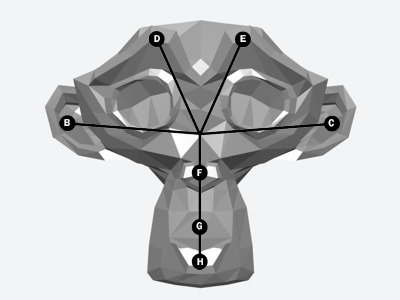
The bones work as follows:
B/C - Ears
D/E - Brow
F - Nose
G - Snout
H - Jaw
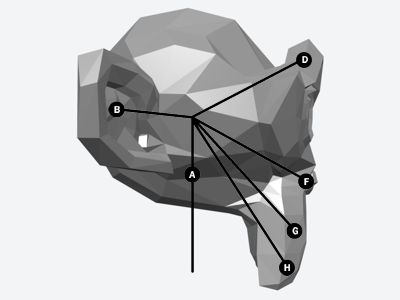
Here is a side view, in which the "A" bone (the primary head bone) is visible.
I am working with a low-poly head, made up of about 500 polygons. The poly count could be higher (more polys = smoother shape), but I am keeping it simple for now. Hopefully this "bone-based approach" will work. I need a more or less functional monkey head by March 15th to meet the deadline I am working with. The next week and a half is going to be very, very busy!
Working on Panda Puppet I was stuck for quite awhile trying to figure out a work around for this problem until I stumbled across an article on bone based facial animation. I won't bore you with all the details (if you really want them, click the link) but essentially the idea is to stick a bunch of bones in a character's head and have each one control a different area of the character's face.
Here's how I am currently rigging using the default monkey head in Blender:
The bones work as follows:
B/C - Ears
D/E - Brow
F - Nose
G - Snout
H - Jaw
Here is a side view, in which the "A" bone (the primary head bone) is visible.
I am working with a low-poly head, made up of about 500 polygons. The poly count could be higher (more polys = smoother shape), but I am keeping it simple for now. Hopefully this "bone-based approach" will work. I need a more or less functional monkey head by March 15th to meet the deadline I am working with. The next week and a half is going to be very, very busy!
Tuesday, February 13, 2007
What you can't do in Machinima (for now)
This animation test above is a fantastic example of pose-to-pose animation (even if it is a "test") from Pixar. As I've mentioned many times here before, one of the inherent limitations of Machinima as it exists today is that the available authoring tools are really unintuitive and don't allow for much expression. Even the best examples of Machinima puppeteering like the ILL Clan's Trash Talk With ILL Will - which won a Mackie for best virtual performance at 2006 Machinima Awards - are ridiculously crude compared to what most puppeteers and animators can do.
I also like this fantastic clip from Aardman. It's done with Claymation of course, but it's so simple there is no reason something very similar couldn't be done in real-time. There is absolutely no reason high-quality animation work can't be done in real-time. The only problems is that a) you need fast enough hardware to render enough polygons on screen and b) there aren't simplified tools that allow you to create great performances.
All it takes is a little money to solve the first problem and, well, I'm working on the second.
Saturday, January 27, 2007
Bigger (and more expensive) isn't better
While discussing my work thus far on the Panda Puppet system earlier this week, a colleague who I respect and love dearly scoffed at the notion that you could build a decent, high-end digital puppetry system using a free open source program that has a relatively tiny 7 mb installer.
"You need Motionbuilder," he told me. "You need Maya. Don't waste your time on this open source stuff." So we had to agree to disagree, but to underscore my position that bigger (and more expensive) isn't better I direct you to the story of the spoon and the jackhammer.
Note that the point of the story isn't that the spoon is the easier tool to use, just that it's ultimately the better one.
"You need Motionbuilder," he told me. "You need Maya. Don't waste your time on this open source stuff." So we had to agree to disagree, but to underscore my position that bigger (and more expensive) isn't better I direct you to the story of the spoon and the jackhammer.
Note that the point of the story isn't that the spoon is the easier tool to use, just that it's ultimately the better one.
Saturday, January 20, 2007
How to Puppeteer a Head in Machinima
Lip sync and effective control of a characters' head on screen has been a difficult challenge for Machinma creators. Unless you count the high-end real-time animation being done by Disney and Henson, I haven't seen any Machinima with effective animation of a character's head. There have been some noble attempts, but all of them look pretty stiff and boring to me.
An interesting solution to this problem that I have been toying with for awhile is to have the computer visually track the movement of a puppeteer's hand, much like the way that the Nintendo Wii tracks the movements of players holding a Wii remote. Michael Nitsche, an Assistant Professor at Georgia Tech recently emailed me about PuppetShow, a very cool looking system some of his students have put together to control the heads of digital puppets with the Unreal Game Engine.
As you can see in the video, PuppetShow tracks the coloured object and the digital puppet moves on screen accordingly. This isn't new technology of course, but what I think is really cool about it is how accessible it is...all you need is a coloured piece of paper, a USB webcam and some free software. It's a limited system right now, but I like the way it puts head movement back (literally) in the hand of the puppeteer.
Basic lip sync can be achieved in a system like this through the movement of the puppeteer's thumb, but the puppet's mouth can't enunciate and the results are still pretty stiff. Many Machinima creators have suggested using some kind of voice analysis or lip sync software like Magpie as a way to create lip sync and enunciation, but I like the idea of a puppeteer having direct control over all aspects of the puppet's head.
In conventional puppetry puppeteers do not actually articulate each word that a character says. The puppet's mouth usually only opens once for each syllable that the character speaks; the mouth is open on vowel sounds (a-e-i-o-u) and closed on consonants. Therefore to achieve realistic lip sync a puppet doesn't have to be able to enunciate perfectly, it just has to be rigged to be able to open and close it's mouth and make these four different shapes:

Each of these mouth shapes could be pre-established as a keypose on a digital puppet and triggered by the puppeteer pressing a button (possibly located inside some kind of data glove or control mitt) or making a specific gesture.
By combining this approach to lip sync with the visual tracking of PuppetShow, Machinima creators could really, finally have a great system for puppeteering their characters' heads in real time.
An interesting solution to this problem that I have been toying with for awhile is to have the computer visually track the movement of a puppeteer's hand, much like the way that the Nintendo Wii tracks the movements of players holding a Wii remote. Michael Nitsche, an Assistant Professor at Georgia Tech recently emailed me about PuppetShow, a very cool looking system some of his students have put together to control the heads of digital puppets with the Unreal Game Engine.
As you can see in the video, PuppetShow tracks the coloured object and the digital puppet moves on screen accordingly. This isn't new technology of course, but what I think is really cool about it is how accessible it is...all you need is a coloured piece of paper, a USB webcam and some free software. It's a limited system right now, but I like the way it puts head movement back (literally) in the hand of the puppeteer.
Basic lip sync can be achieved in a system like this through the movement of the puppeteer's thumb, but the puppet's mouth can't enunciate and the results are still pretty stiff. Many Machinima creators have suggested using some kind of voice analysis or lip sync software like Magpie as a way to create lip sync and enunciation, but I like the idea of a puppeteer having direct control over all aspects of the puppet's head.
In conventional puppetry puppeteers do not actually articulate each word that a character says. The puppet's mouth usually only opens once for each syllable that the character speaks; the mouth is open on vowel sounds (a-e-i-o-u) and closed on consonants. Therefore to achieve realistic lip sync a puppet doesn't have to be able to enunciate perfectly, it just has to be rigged to be able to open and close it's mouth and make these four different shapes:
Each of these mouth shapes could be pre-established as a keypose on a digital puppet and triggered by the puppeteer pressing a button (possibly located inside some kind of data glove or control mitt) or making a specific gesture.
By combining this approach to lip sync with the visual tracking of PuppetShow, Machinima creators could really, finally have a great system for puppeteering their characters' heads in real time.
Thursday, October 05, 2006
Machinima Application Design Requirements
Brian Stokes has posted a great piece on his blog about Machinima/Digital puppetry application design requirements; essentially laying out what's lacking in the tools currently available for Machinima creators. I really agree wholeheartedly with all of his thoughts, especially the need for better assets and really kick-ass sequencer software. Be sure to check it out.
Saturday, August 19, 2006
'Game sketching' and puppetry in video games
Professor John Buchanan from Carnegie Mellon's Entertainment Technology Centre spoke at the Melbourne International Film Festival's X Media Lab last week about a concept he calls "game sketching", where puppeteering is used to help design and build video games more affordably. It's just one more example of how puppetry techniques can be applied to digital technologies and I'm not surprised to hear it coming from one of the Entertainment Technology Centre's professors since the institution is one of the world's leading centres for digital puppetry research.
Monday, December 05, 2005
King Kong and the Uncanny Valley
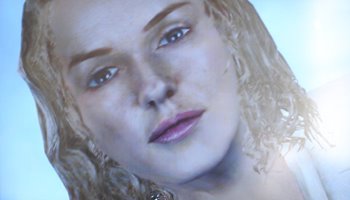
The CG Naomi Watts in Ubisoft's new Kong Kong game for the Xbox 360 (photo © Ubisoft).
Clive Thompson has an article over at Wired about the new King Kong game for the Xbox 360 and the Uncanny Valley. Clive observed that the drawback of the new high-definition Xbox 360 is that it can create near life-like graphics, with the near part being the problem.
 The Uncanny Valley is a concept first proposed by Japanese roboticist Masahiro Mori who observed that people have a certain level of comfort and affection towards an object that is anthropomorphic (think Hello Kitty) and resembles a human without attempting to imitate one. The higher the level of anthropomorphism, the more comfortable and attractive the object will be, but once the object too closely resembles a human people feel uneasy until the object achieves perfect mimicry of a living human at which point it becomes acceptable again. If you graph this comfort level on a chart the large uncomfortable dip in the resulting curve is called "the Uncanny Valley".
Machinima is hailed as a revolution in cinema (and I think it will be) but one of the barriers to mainstream audience acceptance it's bound to hit is the Uncanny Valley. The problem is the visual aesthetic of the most popular games used to create Machinima - Quake, Half-Life, Halo, even the somewhat anthropomorphic The Sims. Although millions of gamers have grown up on it, the video game aesthetic when it comes to humans is usually ugly and creepy and that could pose a problem if you try to reach out to large, Hollywood-sized audience.
This problem isn't unique to machinima, the mainstream computer animation industry has grappled with this too, as John Martz brilliantly documented in his now-famous blog post Pixar and the Uncanny Valley. In the puppetry world, the reason I think The Muppets are much more appealing to the mass audience than traditional marionettes is mostly because the Muppets are anthropomorphic while most marionettes fall in to the dead zone of the Uncanny Valley. I don't think that it's a coincidence that Shigeru Miyamoto - creator of Super Mario Bros. and probably the most successful game designer of all time - has consistently relied on a highly stylized, anthropomorphic design approach despite the advances in computer graphics over the past twenty-five years. Miyamoto knows what works visually and what appeals to an audience and he gives it to them.
So I think that until tools to create truly realitic humans and animation in real-time are developed, the solution to this problem is to create films and series that heavily rely on anthropomorphism. I'm in the process of modeling the first character that will be used to test Panda Puppet and it will be a very anthropomorphic, low-poly model to ensure that it will be both appealing and easily rendered in real-time.
Subscribe to:
Posts (Atom)